WordPress / Dog hotel and senior home
Wonderful Home
Openings and prices
counted by the admin.
A website for Wonderful Home, a fictional dog hotel and senior dog home run in a house with a garden in Ome, Tokyo. It is a site in a WordPress multisite network with eleven pages: home, first visit, dog hotel, senior home, prices, availability and booking, the stay diary, news, the house and staff, visits and questions, and the privacy policy. Its centrepiece is an admin that calculates. Openings are never set by hand: the site counts them day by day from the number of rooms and the bookings. The price table, the availability calendar and the booking estimate all read one admin page, Prices and opening days. The page shows, with the screens before and after, a phone booking changing an availability mark and a busy period raising the booking estimate. The site is in Japanese only, and the booking and visit forms go through to their completion screens without sending anything.
Open the siteThis work is an original adaptation of a commissioned project.
Photos cut
into a shiba.
After comparing how similar facilities organise their sites and price their stays, the warm Nordic home direction was chosen from four mockups made with Codex. The background is off-white, the text dark brown, the accents terracotta and sage, and the headings a rounded Japanese sans-serif. The dog hotel and the senior home carry equal weight, so the homepage opens both with two cards of the same size.
The 61 photos were made with Codex. Reference sheets for the shiba mascot and the three staff members came first and were checked before the rest, so the same dog and the same people appear across the pages.
The site's signature is the shiba frame. The homepage photo, the two entry cards and the diary cards are cut into the shape of a shiba looking left. As a frame comes into view it turns from an arch into the shiba, an ear twitches now and then, and the ears fold back under the mouse.
Edit one place
and three change.
One page was added to the admin: Prices and opening days. The hotel's nightly prices (12 fields: three weight classes × two room types × regular and busy), the number of rooms, the options, the senior home's monthly fees, the busy periods, the closed weekdays and per-day settings for the next two months are all edited here. Every field is checked before saving, and if any one is wrong, nothing is saved.
The price table, the availability calendar and the booking estimate read these settings through the same single function, so one save changes all three together. Openings are the number of rooms minus that night's bookings, and the site counts the ○, △ and × marks each day. Bookings taken by phone are added one by one to the bookings list. The sample bookings make way for them, and only a booking that lands on a night already filled by phone bookings is not published: it goes back to draft with a notice. Changing the closed weekdays also changes sentences such as "except Wednesdays" in the phone hours in the header and footer.
The salon on the same WordPress used ACF for its input fields. This site uses neither ACF nor a booking plugin: the admin page, the input fields and the calculations are all written in the child theme's PHP and JavaScript. That gives shapes such as the 12-field price table and the list of busy periods exactly as planned, and no outside plugin update can break them.
See the openings
then book from there.
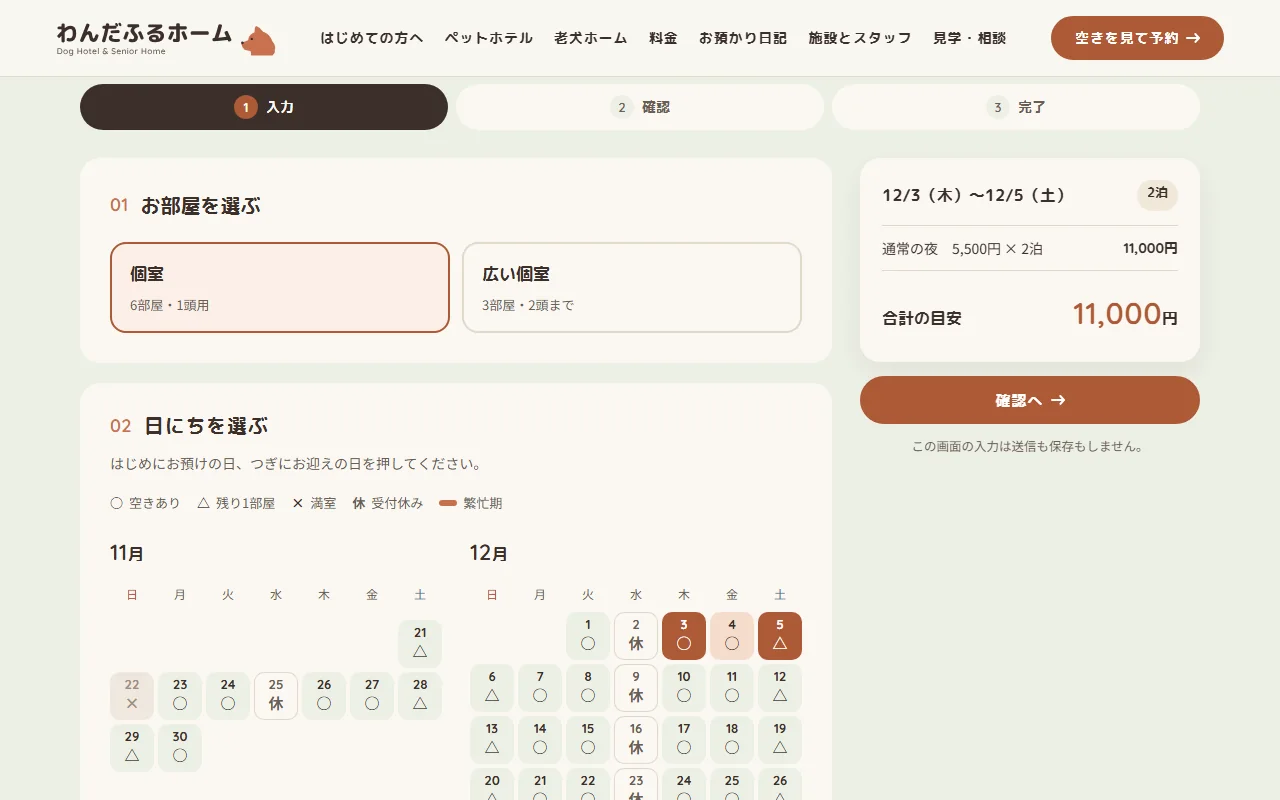
On the availability and booking page, the visitor picks a room and taps the drop-off and pick-up days on a two-month calendar. The calendar shows ○, △ and × marks, an underline on busy nights and a closed sign (休) on closed days. Each time the weight, the number of dogs or the options change, the estimate on the right is added up again night by night at the regular or busy price.
If the stay includes a closed day or a full night, the estimate gives the reason instead and the form does not go on. The input, confirmation and completion screens can all be tried, but the input stays in the browser: nothing is sent or saved. The senior home's visit and question form works the same way.
Someone is there at night
told by scrolling.
The homepage's main moment is From day to night. The screen holds still while scrolling swaps four photos of the same room, morning, noon, evening and night, turns the background from off-white to night blue, and finally floats tags such as 22:00 rounds and 2:00 checking their breathing. Next, A day's stay turns a clock's hands over a timetable that scrolls sideways on wide screens. In One photo through the years the shiba mascot grows from a puppy into an old dog, and a line of paw prints draws itself from the two entry cards to the next section.
The motion uses no outside library, only requestAnimationFrame and IntersectionObserver. Only what is on screen moves, and visitors who set their device to reduce motion see everything laid out flat instead. Search, date and author lists that the site does not have return 404, and every page is set to stay out of search engines.
Project details
- Version
- 1.0.0
- Project type
- Fictional website
- Scope of work
- Design and build of a WordPress child theme, the prices and opening days screen, the openings and price calculations, and the booking and diary input fields
- Tools
- WordPress (multisite) / SQLite / WP-CLI
Web parts plugin - Pages
- 11 pages, including the diary and news lists; 8 diary entries and 4 news posts
- Languages
- Japanese
- Breakpoints
- 960px and up / 600–959px / 599px and below
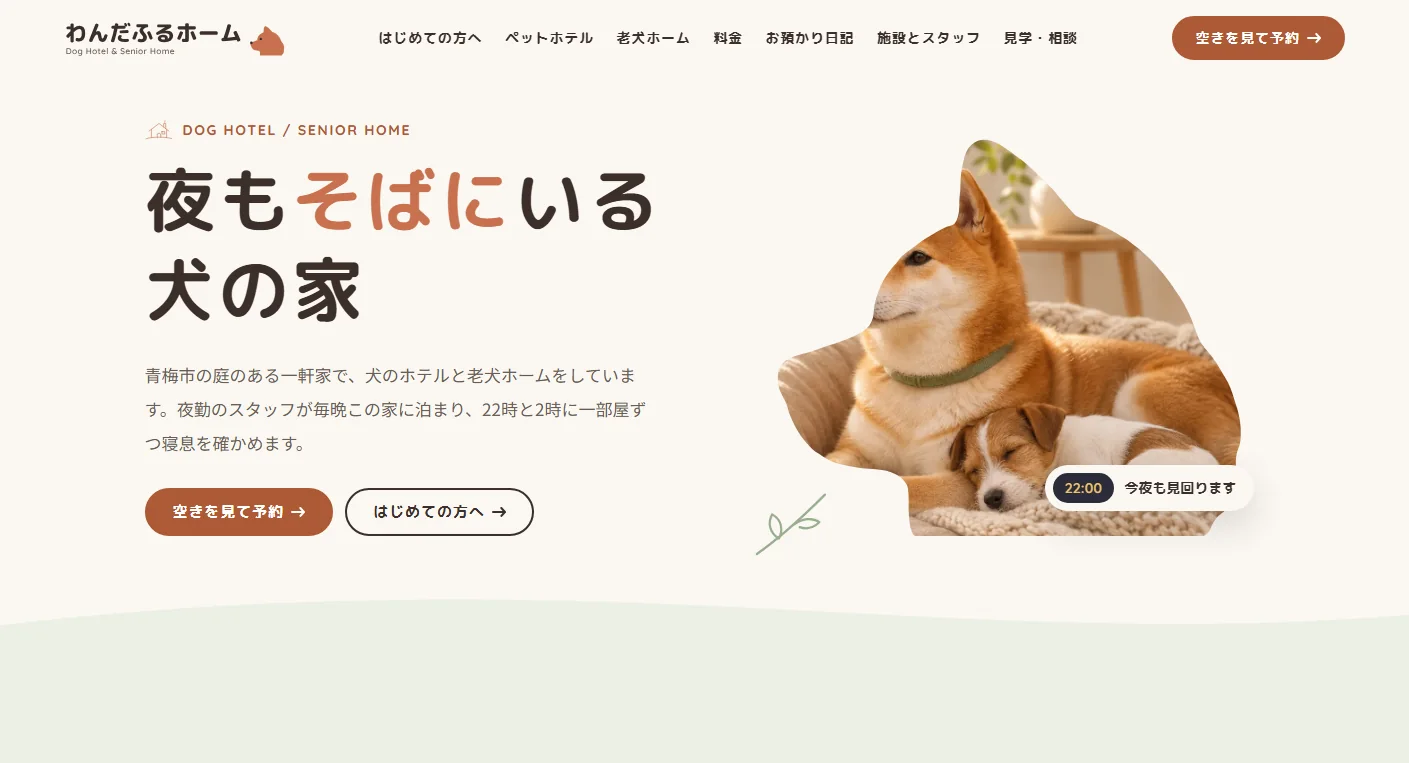
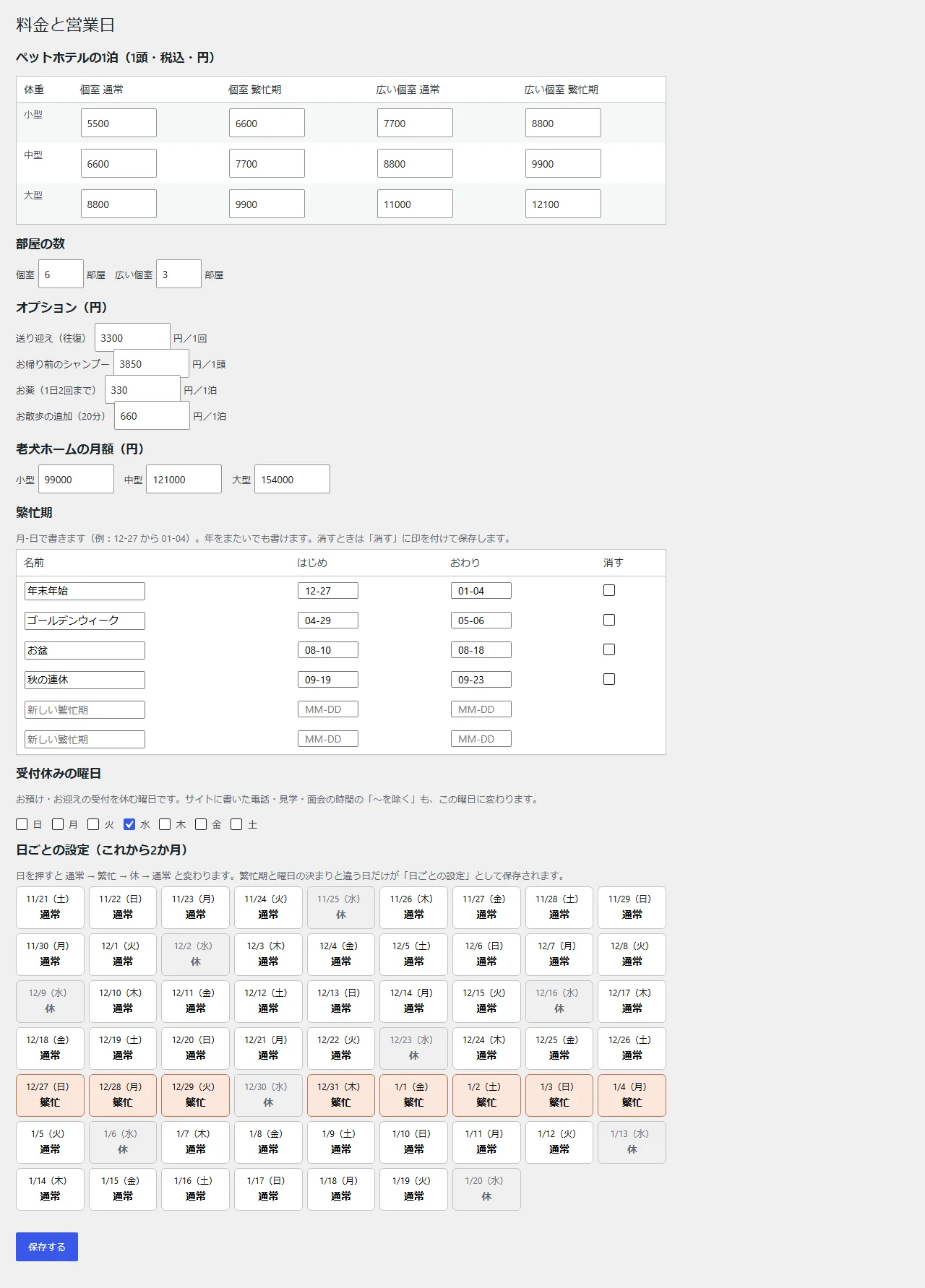
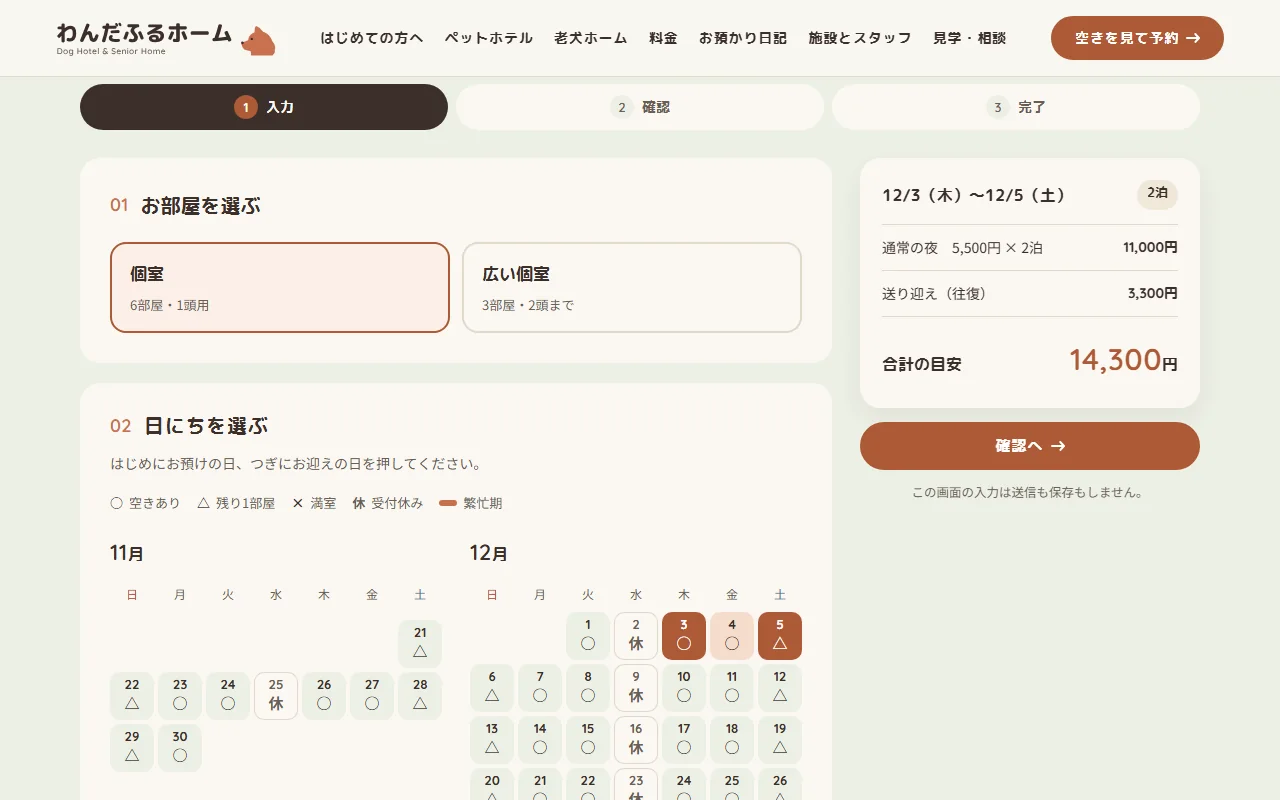
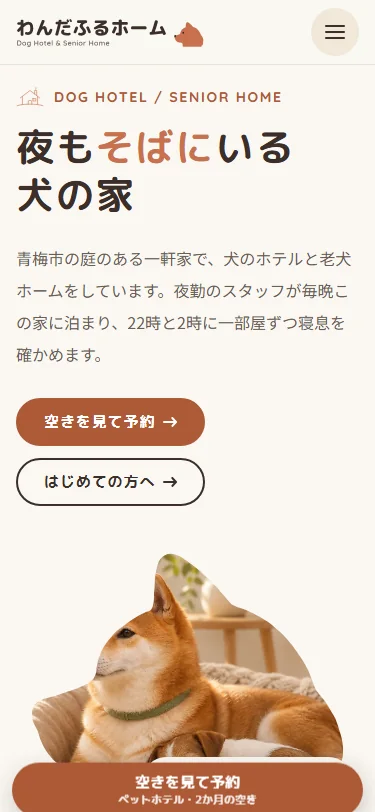
The live site
beside the admin screens.
What the client edits in the admin, each shown beside the live site. For the screenshots, a busy period and a phone booking were each added on the live site, and the before and after were taken in the same place (both were removed afterwards).
-
01Price table
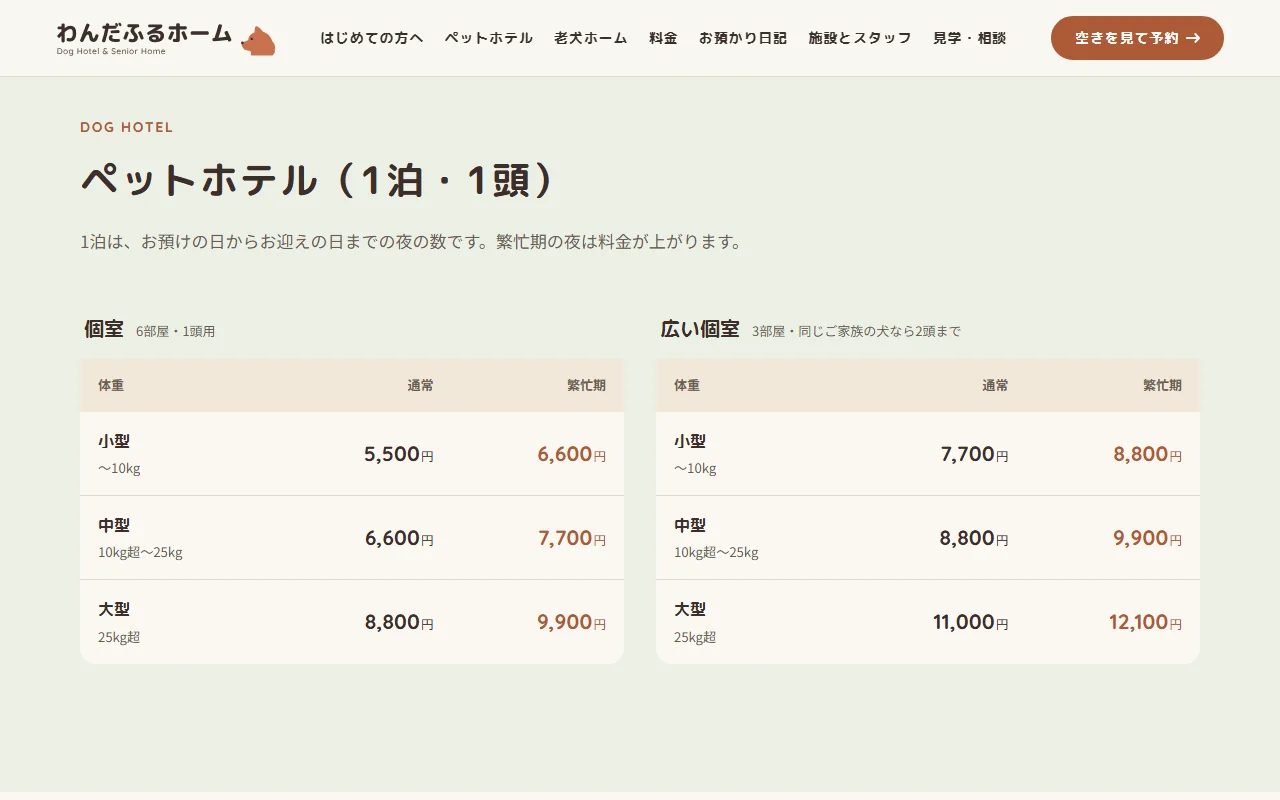
The tables on the prices page show the 12 fields of Prices and opening days as they are. Each weight class has its regular and busy nightly price, and counts such as "6 rooms, one dog each" next to the room names come from the room count fields.
Saving with a field that is not a number, or left empty, lists which fields are wrong and saves nothing. Saved prices appear from the next page load in the price table, the availability and the booking estimate alike.
Live site 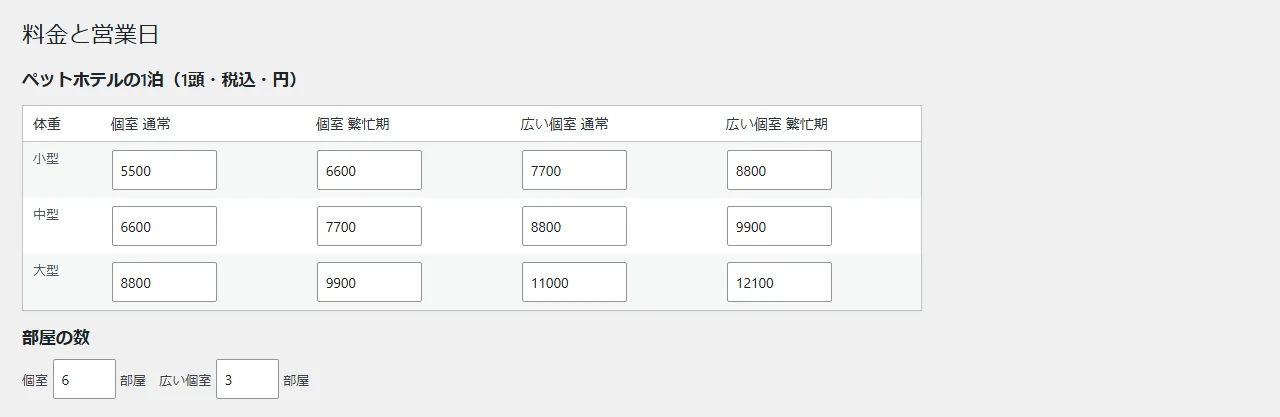
Admin (Prices and opening days) -
02Adding a busy period
Each busy period is one row: a name and a month-day start and end. A period may run across the new year, and ticking remove and saving deletes it. The per-day settings can also make a single day busy or closed.
For the screenshots, a winter holidays period was added for the nights of December 3 and 4. The estimate for the same two nights in a private room went from regular nights at 5,500 yen × 2, 11,000 yen, to busy nights at 6,600 yen × 2, 13,200 yen, and those two days on the calendar gained the busy underline.
Live site (before adding the busy period) 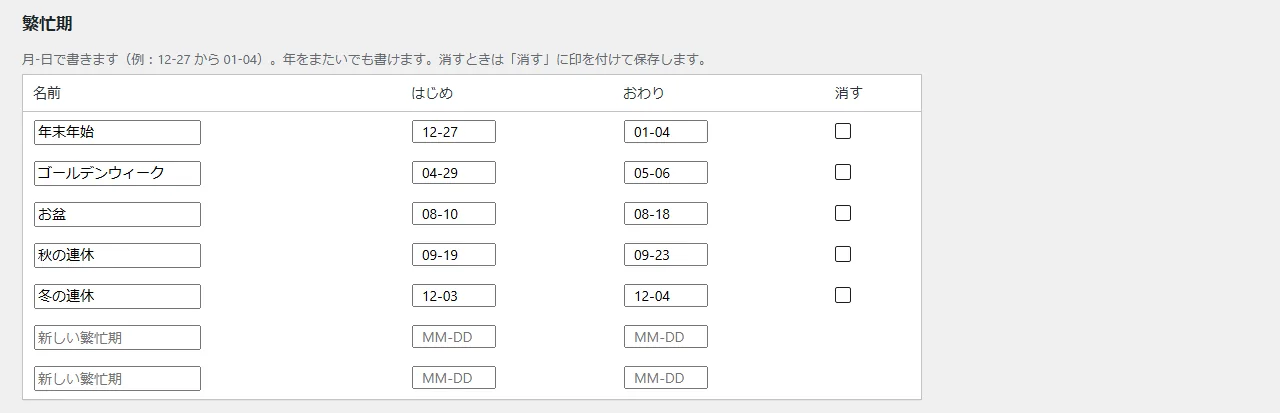
Admin (winter holidays added) 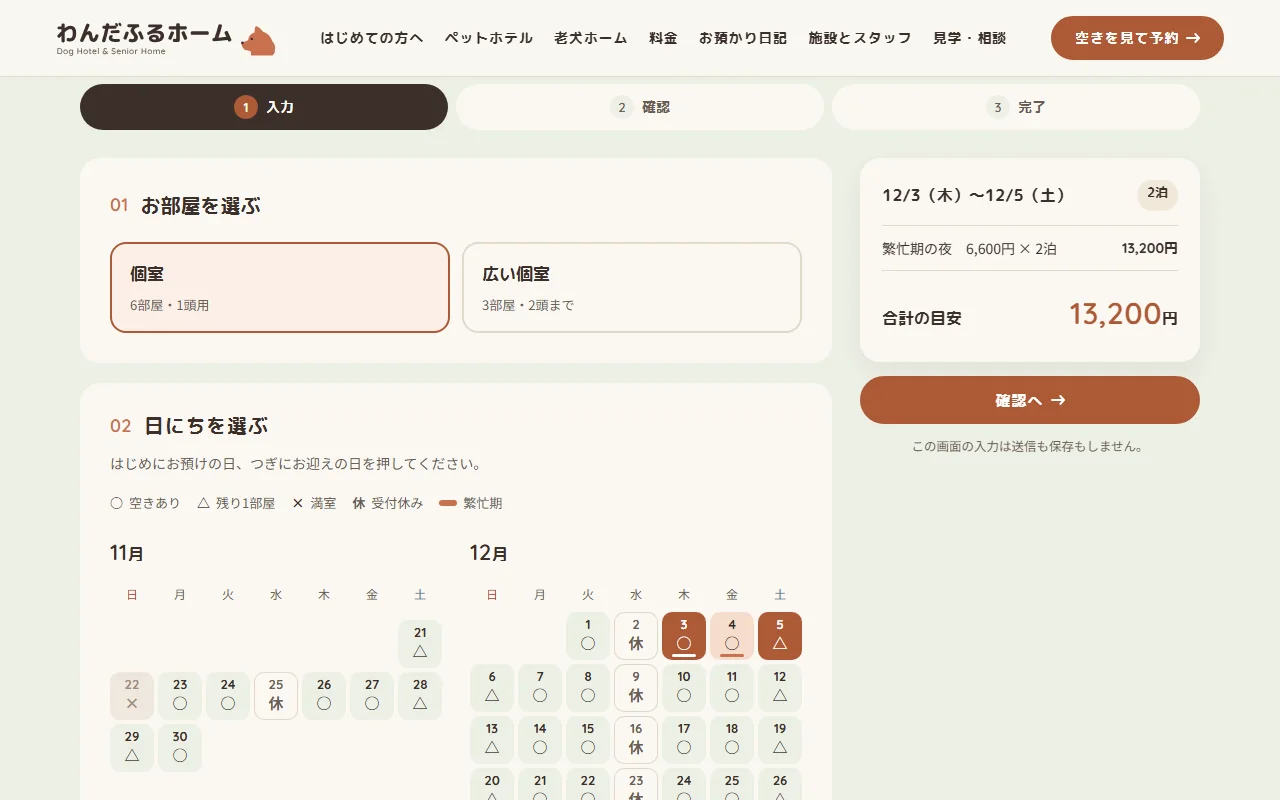
Live site (after) -
03Adding a phone booking
Bookings taken by phone are entered from Add a phone booking in the bookings list. Publishing one with the room, the drop-off and pick-up days, the weight, the number of dogs and the dog's name takes one opening off those nights.
For the screenshots, a one-night booking was added on November 22, where the homepage's next two weeks showed △ (one room left) for private rooms. Once it was published, the same day's private rooms turned to × (full). The list also holds sample bookings remade every day so the dates never go stale, and phone bookings stay apart from them.
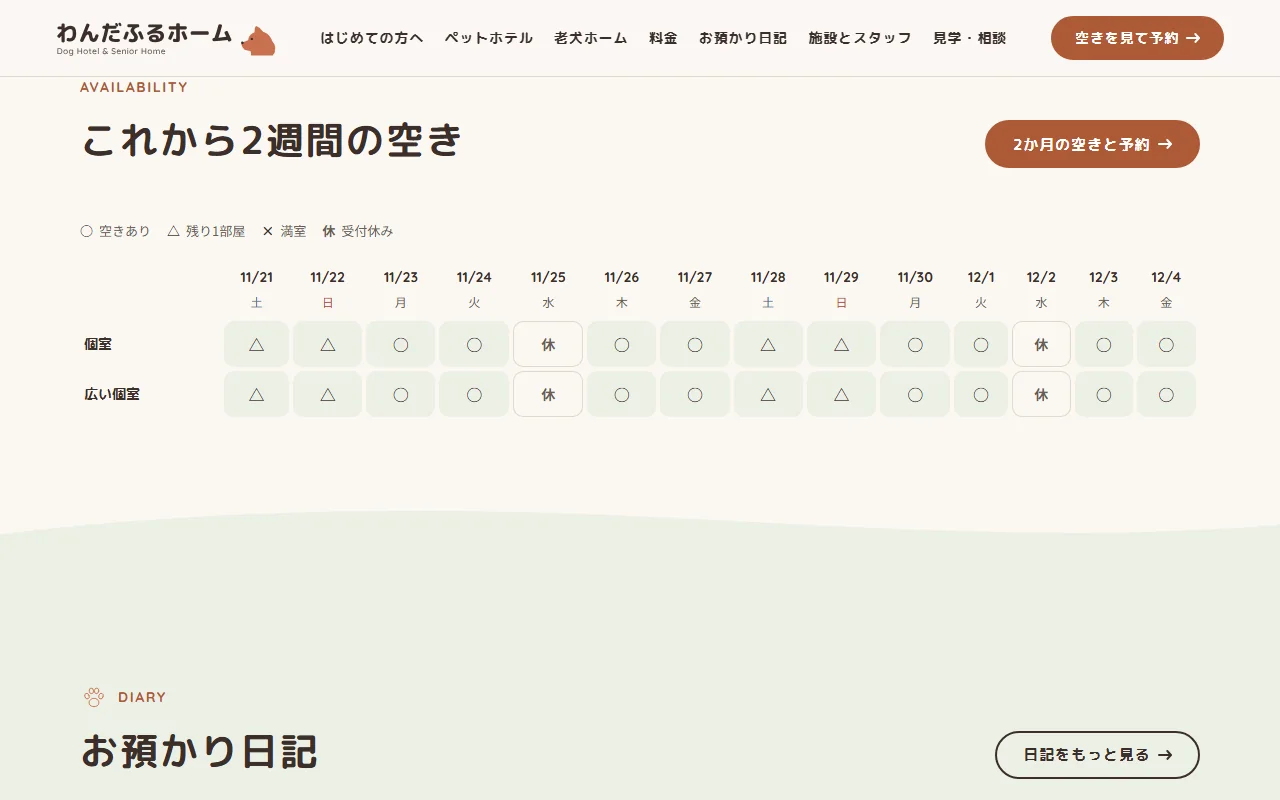
Live site (before adding the booking) 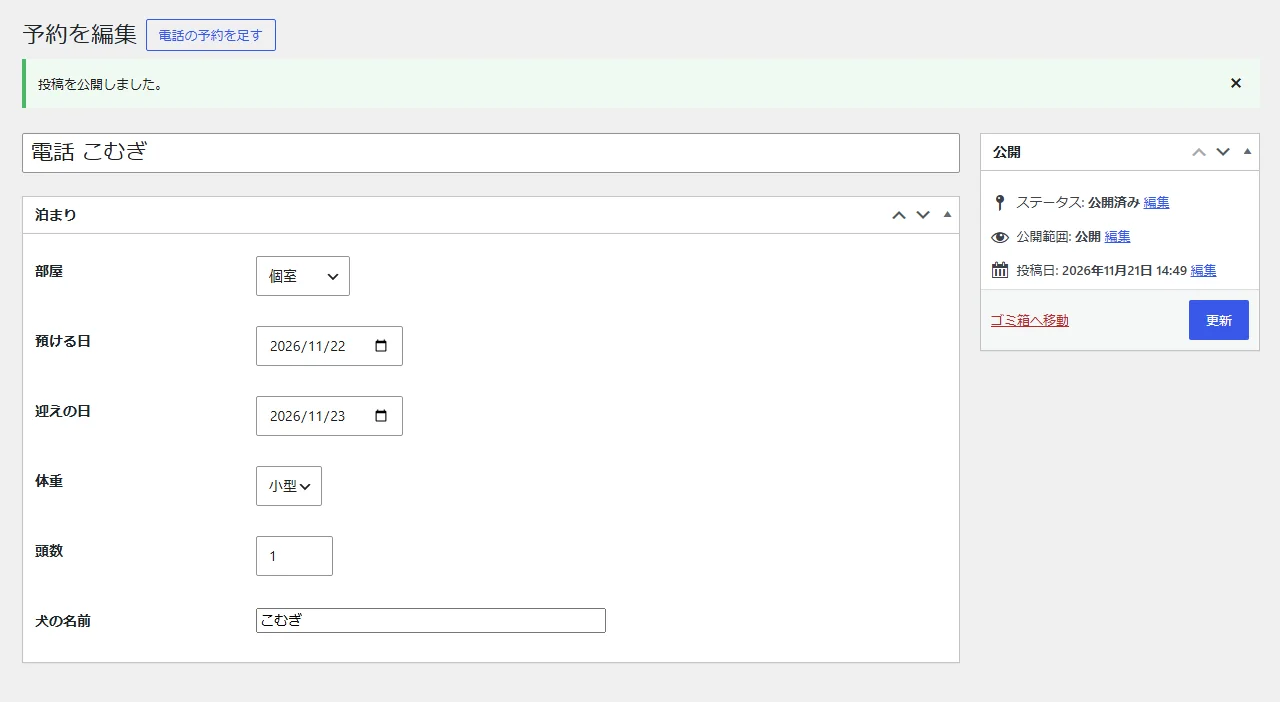
Admin (phone booking added) 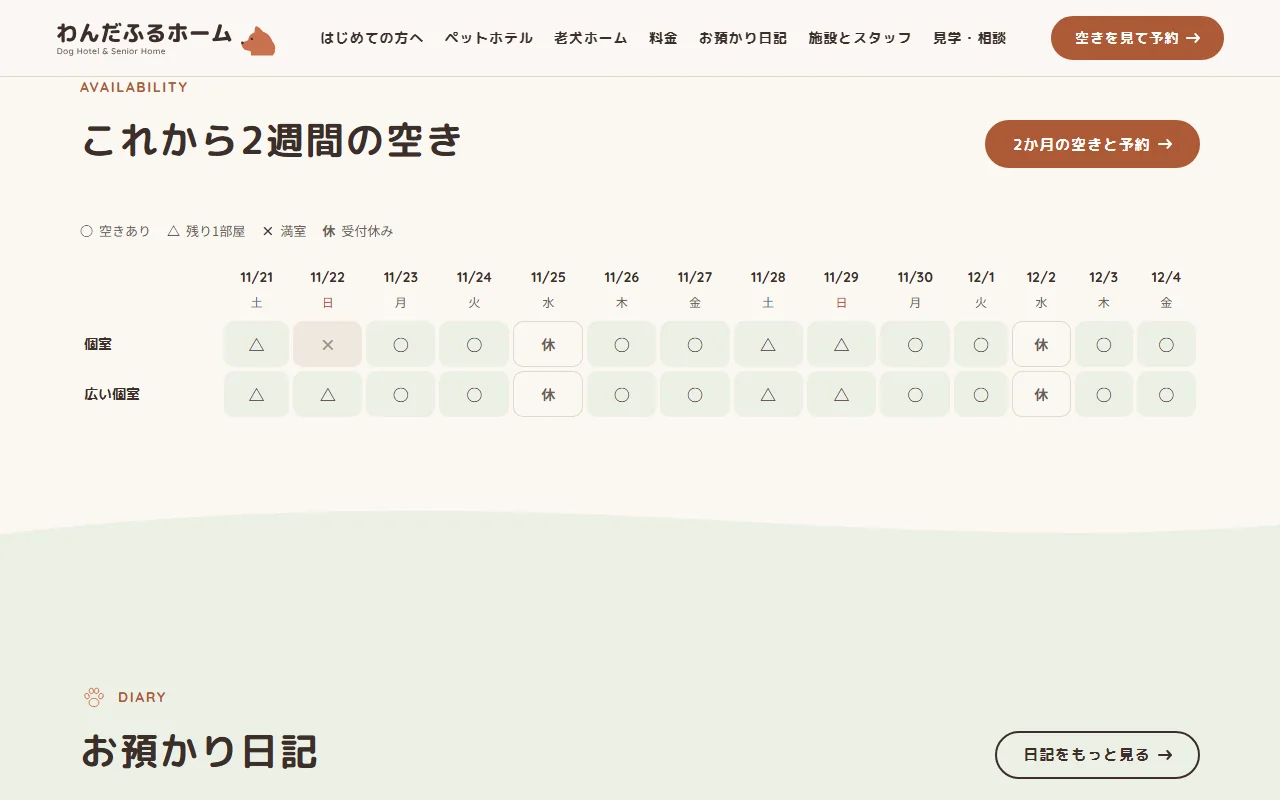
Live site (after) -
04Stay diary
The stay diary is a post type the staff write in WordPress's usual editor. Besides the title, text and featured image, fields were added for the dog's name, breed (age), hotel or senior home, and where to focus the photo inside the shiba frame on the list.
Choosing left, centre or right for the focus shifts the photo so the dog's face stays inside the shiba frame on the list cards. Once published, the entry leads the diary list and the newest entries on the homepage.
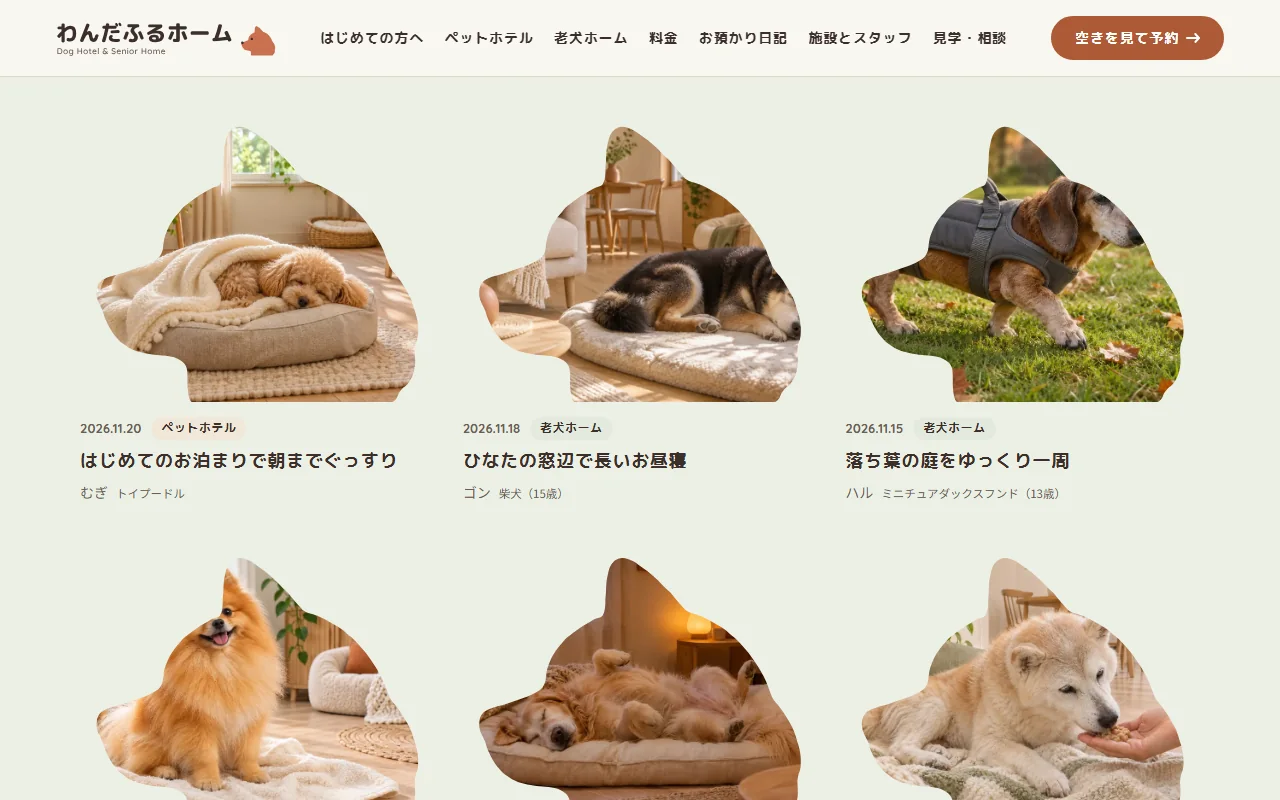
Live site 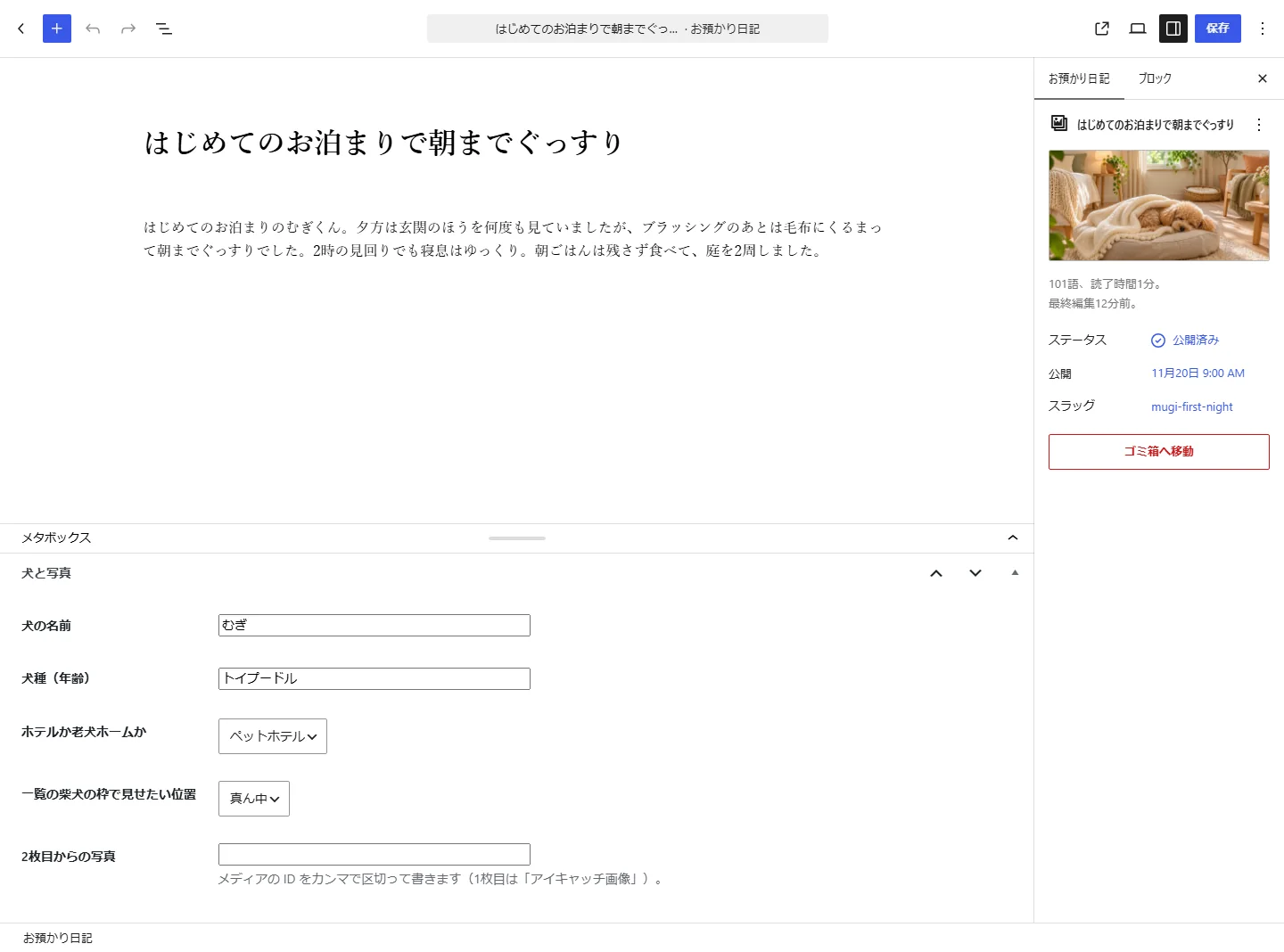
Admin (diary fields)